
How to Clear Instagram Cache on iPhone and Android

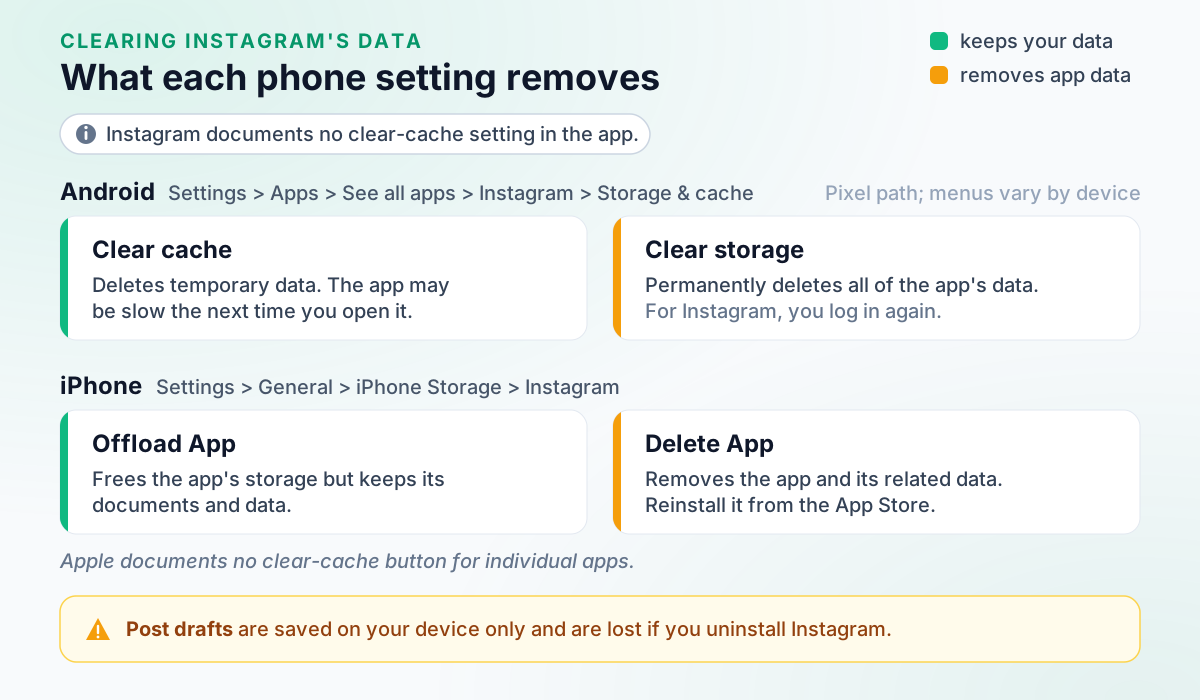
Instagram documents no clear-cache button inside its app, so you do it from your phone’s settings. To clear cache, Instagram users on Android go to Settings, Apps, Instagram, then its storage options to pick Clear cache (temporary data) or Clear storage (all app data). On iPhone, Apple offers offloading, which keeps the app’s data, or deleting, which removes it.
Before you reach for the heavier option, know the loss Instagram does warn about: post and reel drafts live only on your phone. Other fixes sit alongside every other task in the full Instagram guide.
Table of Contents
- Can you clear cache in Instagram itself?
- How to clear Instagram cache on Android
- Clear cache vs clear storage: what each one deletes
- How to clear Instagram cache on iPhone
- How do you clear Instagram cache on a computer?
- Will clearing the cache delete drafts or log you out?
- When does clearing the cache help?
- Instagram cache: FAQ
Can you clear cache in Instagram itself?
Not in any way Instagram documents. Its Help Center describes no clear-cache setting inside the app on iPhone or Android, and its only cache article covers Android’s own settings. Checked against Instagram Help Center: Adjust your Android settings for Instagram (no in-app cache setting documented)Not verified So every method below uses Instagram’s, Google’s or Apple’s own settings. Skip “cleaner” apps that promise to do it for you.
Clearing your search history is a different job, done inside Instagram: see how to delete your Instagram search history.
How to clear Instagram cache on Android
Open your phone’s Settings, go to Apps, then Instagram, and use the storage options there. Instagram’s own article stops at the Instagram screen, where it says you can uninstall the app or clear your cache and data. Menu names vary by Android device.
On Android:
- Open your phone's settings.
- Tap Apps.
- Scroll down and tap Instagram.
Checked against Instagram Help Center: Adjust your Android settings for Instagram.
Google’s steps for a Pixel phone go further. Other Android phones may label things differently:
On Android: on a Pixel phone:
- Open your device's Settings app.
- Tap Apps, then See All Apps.
- Tap the app.
- Tap Storage & cache, then Clear cache or Clear storage.
Checked against Pixel Phone Help (Google): Free up space on a Pixel phone.
Tap Clear cache first. Clear storage is the heavier reset, explained next.
Clear cache vs clear storage: what each one deletes
Clear cache deletes temporary data; Clear storage permanently deletes all of the app’s data. Those are Google’s definitions. Google adds that some apps may be slow the next time you open them after clearing the cache, and suggests deleting data within the app before clearing storage. For Instagram, clearing storage means logging in again. Checked against Pixel Phone Help (Google): Free up space on a Pixel phone
Instagram’s article blurs the two, describing clearing cache and data as resetting “all of the memory on your phone”. Go by the labels on your phone’s screen. Checked against Instagram Help Center: Adjust your Android settings for Instagram
How to clear Instagram cache on iPhone
Apple documents no button to clear one app’s cache, so the choice is offloading Instagram or deleting it. Apple says offloading frees the storage the app uses but keeps its documents and data, so don’t count on it to clear cached data. Deleting removes the app and its related data; you then reinstall it from the App Store.
On iPhone:
- Open Settings.
- Tap General.
- Tap iPhone Storage to see recommendations and a list of apps with their storage usage.
- Tap an app's name for more information about its storage.
Checked against Apple Support: How to check the storage on your iPhone and iPad.
The app’s storage screen is where you offload or delete it. Apple notes that cached and temporary data might not count as usage, so the figure shown may not include everything Instagram has stored. On an iPad, the screen is called iPad Storage.
Apple also says iPhone clears cache on its own: to free up space, the device removes cached and temporary files, so you don’t have to. Checked against Apple Support: How to check the storage on your iPhone and iPad If you do delete Instagram, Instagram’s troubleshooting steps say your photos and profile info will be saved by Instagram; that line says nothing about drafts. Checked against Instagram Help Center: Troubleshooting (uninstall and reinstall)
How do you clear Instagram cache on a computer?
Delete instagram.com’s site data in your browser. Instagram documents no cache steps of its own, and Google’s and Apple’s articles are generic, so search for or select instagram.com. Doing this may sign you out of Instagram in that browser.
On the web: in Google Chrome:
- On your computer, open Chrome.
- At the top right, select More, then Settings.
- Select Privacy and security, then Third-party cookies.
- Select See all site data and permissions.
- At the top right, search for the website's name.
- To the right of the site, select Delete.
- To confirm, select Delete.
Checked against Google Chrome Help: Delete, allow, and manage cookies in Chrome (Computer).
On the web: in Safari on Mac:
- Go to the Safari app on your Mac.
- Choose Safari > Settings, then click Privacy.
- Click Manage Website Data.
- Select one or more websites, then click Remove or Remove All.
Checked against Apple Support (Safari User Guide): Clear your cache and cookies in Safari on Mac.
Apple adds that removing website data in Safari may change or remove it in other apps, and menu names can differ on older Safari versions.
Will clearing the cache delete drafts or log you out?
Drafts are the risk Instagram spells out: they’re saved onto your device, can’t be opened from another device even when you log in, and are lost if you uninstall the app. Checked against Instagram Help Center: Save a post as a draft on Instagram Reel drafts are saved onto your device too. Checked against Instagram Help Center: Save and edit drafts of your reel on Instagram Clear storage permanently deletes all of the app’s data and means logging in again, so share or save any draft you need first.
Apple says offloading keeps an app’s documents and data, while deleting removes them. Checked against Apple Support: How to check the storage on your iPhone and iPad Instagram’s warning is about uninstalling.
For a reel, Instagram offers a way to keep the draft outside the app: save it to your camera roll. Music you added from Instagram’s music library isn’t saved with it.
In the Instagram app: save a draft to your camera roll:
- Tap Next on the reel you're recording.
- Swipe up to edit.
- Swipe left to right, then tap Save at the bottom.
In the Instagram app: edit a draft from your camera roll:
- Tap Create at the top or swipe right from anywhere in Feed.
- Scroll to Reel at the bottom of the screen.
- Tap to choose the draft of the video you want to edit from your camera roll. You may tap Recents, then tap Videos in the top left to filter out recent videos from your camera roll.
Checked against Instagram Help Center: Save and edit drafts of your reel on Instagram (camera roll).
Where drafts live and how to find them is covered in how to save an Instagram post as a draft.
When does clearing the cache help?
Instagram’s troubleshooting article doesn’t list clearing the cache. Its order is: update the app and your phone’s software, restart the phone, try both Wi-Fi and mobile data, then uninstall and reinstall. It adds that a feature may simply not be available to everyone yet, and suggests reporting a bug if nothing works. Checked against Instagram Help Center: Troubleshooting
If space is the worry, the storage screens above show Instagram’s storage use. If mobile data is the worry, that’s a setting inside Instagram: it preloads videos by default, and Use less cellular data (iPhone) or Data Saver (Android) cuts that over cellular without affecting Wi-Fi. Checked against Instagram Help Center: Use less data on Instagram
Some problems sit elsewhere. Blurry stories are covered in why your Instagram story is blurry. If Instagram has stopped you posting, Account Status shows features you can’t use, and banned from posting on Instagram explains the appeal. Checked against Instagram Help Center: Check your Account Status on Instagram
Plan your Instagram feed posts in Outfeed AI
Instagram cache: FAQ
How do I clear Instagram cache on iPhone without deleting the app?
Apple documents no way to clear one app’s cache on iPhone. Its iPhone Storage screen offers offloading, which frees the storage the app uses but keeps its documents and data, so don’t count on it to clear cached data. Deleting the app removes it and its related data, and you then reinstall it from the App Store.
Does clearing Instagram cache delete anything?
On Android, Google says Clear cache deletes temporary data, and some apps may be slow the next time you open them. Clear storage permanently deletes all of the app’s data, so you’ll need to log in to Instagram again. Instagram’s own warning is about drafts: they’re saved only on your device and are lost if you uninstall the app.
Is there a clear cache option inside the Instagram app?
Instagram’s Help Center documents none on iPhone or Android. Its only cache article sends Android users to the phone’s own settings, then Apps, then Instagram. On iPhone the options are Apple’s: offload or delete the app from Settings, General, iPhone Storage. Clearing your search history is a separate setting inside Instagram.
How do I clear Instagram cache on a computer?
Delete instagram.com’s site data in your browser. In Chrome, go to Settings, Privacy and security, Third-party cookies, See all site data and permissions, search for instagram.com and select Delete. In Safari on a Mac, choose Safari, Settings, Privacy, Manage Website Data, select instagram.com and click Remove. Either way, you may be signed out of Instagram in that browser.