
Recover YouTube Account: Locked Out, Hacked or Terminated
To recover YouTube account access, you recover the Google Account behind the channel: start at Google’s account recovery page and answer its questions as best you can. Wrong guesses won’t lock you out, and there’s no limit on attempts. A hacked channel needs a cleanup afterwards; a terminated channel needs an appeal instead. Checked against Google Account Help: How to recover your Google Account or Gmail
No outside service can do it for you: Google says it doesn’t work with any service that claims to provide account or password support, and you can’t call Google for help signing in. For the rest of channel management, start with how to grow a YouTube channel. First, find your situation:
| What happened | Where to start |
|---|---|
| You forgot your password or can’t get verification codes | Google’s account recovery page |
| You forgot which email address you sign in with | Google’s username recovery page |
| Someone else took over the channel | Recover the Google Account, then YouTube’s hacked-channel steps |
| You hid or deleted the channel | A hidden channel can be re-enabled; deletion is permanent |
| YouTube terminated the channel | An appeal in YouTube Studio, within 1 year |
| The channel is on a Brand Account | The Google Account of one of its owners or managers |
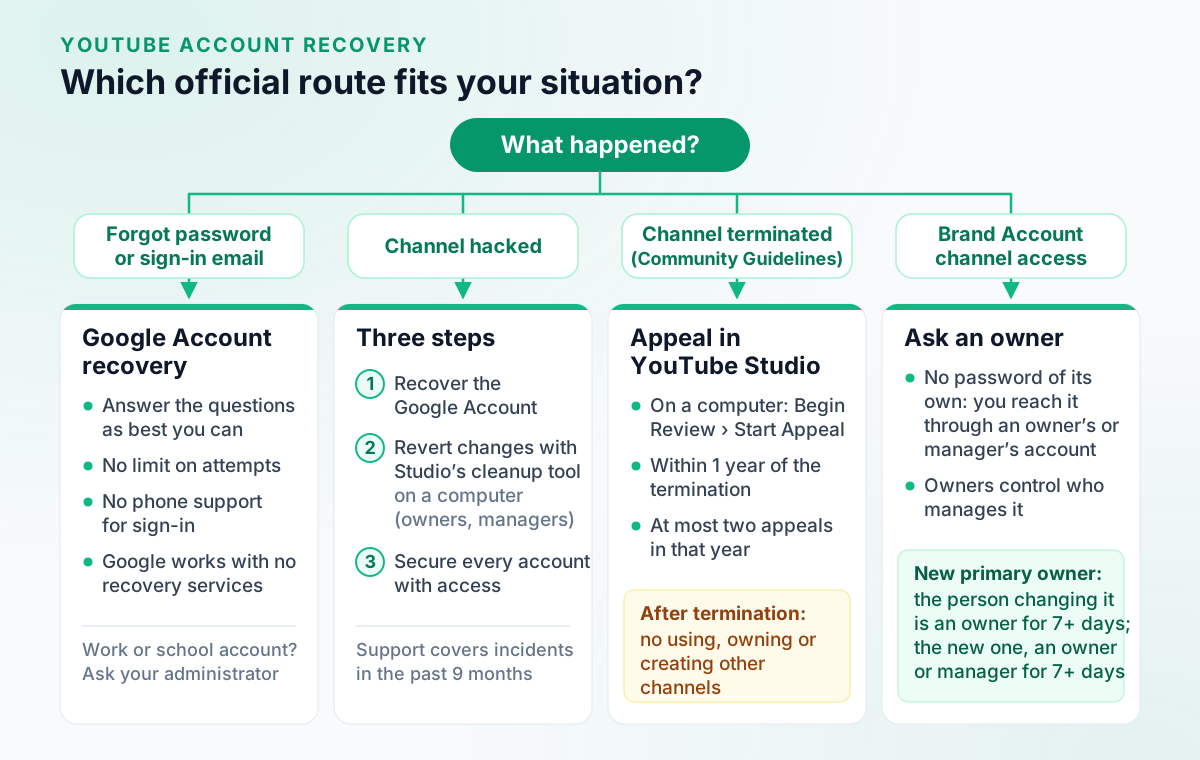
Table of Contents
- How do I recover my old YouTube account?
- Can you recover a YouTube account without the email or phone number?
- How do I recover a hacked YouTube channel?
- Can I recover a deleted YouTube channel?
- How do I appeal a terminated YouTube channel?
- What if the channel is on a Brand Account?
- Can anyone else recover YouTube account access for you?
- Can Outfeed recover a YouTube channel?
- Recovering a YouTube account: FAQ
How do I recover my old YouTube account?
Recover the Google Account you used for it. Start at Google’s account recovery page if you know the email address but not the password, or at the username recovery page if you’ve forgotten the address itself. Google’s steps for both:
On any device: Forgot your password:
- Follow the steps to recover your Google Account or Gmail (accounts.google.com/signin/recovery).
- You'll be asked some questions to confirm it's your account. Answer the questions as best as you can.
- If you have trouble, try the tips to complete account recovery steps.
- Reset your password when prompted. Choose a strong password that you haven't already used with this account.
On any device: Forgot the email address you use to sign in:
- Go to the username recovery page (accounts.google.com/signin/usernamerecovery). You need a phone number or the recovery email address for the account, and the full name on your account.
- Follow the instructions to confirm it's your account.
- You'll find a list of usernames that match your account.
Checked against Google Account Help: How to recover your Google Account or Gmail.
Google’s tips for getting through the questions:
- Answer every question. If you’re unsure, take your best guess rather than skipping it.
- Use a device and browser you usually sign in with, in a location where you usually sign in.
- Enter the most recent password you remember, exactly.
- If you’re asked for an email address, give one that’s already on the account.
Checked against Google Account Help: Tips to complete account recovery steps.
If Google says it couldn’t verify that the account belongs to you, you can try again. If you’re expecting an email from Google, look for one titled “Your Google support inquiry”, and check your spam folder. Changed your recovery phone number or email recently? Those changes can take up to 7 days to take effect. These steps might not work for a work or school account (ask your administrator), and a parent can reset the password on a child’s account. Checked against Google Account Help: How to recover your Google Account or Gmail
A very old channel is a special case: YouTube says some older, unused channels created before May 2009 might not be part of a Google Account and may need to be added to one before they can be used. It publishes no steps for that. Checked against YouTube Help: Use your Google Account for YouTube
Can you recover a YouTube account without the email or phone number?
It depends on what you still have. Finding a forgotten sign-in address needs a phone number or recovery email on the account, plus the full name on it. Checked against Google Account Help: How to recover your Google Account or Gmail If you know the address but can’t get verification codes, Google’s account recovery still applies: answer as best you can, ideally from a familiar device, browser and location, with the most recent password you remember. If Google still can’t verify you, its next step is a replacement Google Account. Checked against Google Account Help: Tips to complete account recovery steps
That last option isn’t a way back for a terminated channel; see the appeal section below.
How do I recover a hacked YouTube channel?
YouTube lists three steps: recover and secure the hacked Google Account linked to the channel, revert the unwanted changes on the channel right away, and secure every account that has access to it. Signs of a hack include changes you didn’t make (profile picture, descriptions, email settings, AdSense for YouTube association, sent messages) and uploaded videos that aren’t yours. Checked against YouTube Help: Recover a hacked YouTube channel
YouTube Help also offers a chat-based hacked channel assistant, available in English, Spanish and Portuguese. Checked against YouTube Help: Recover a hacked YouTube channel
Undo the hacker’s changes
Once you’re back in the Google Account, channel owners and managers can review the unusual activity with YouTube Studio’s cleanup tool on a computer:
On a computer:
- On a computer, go to the cleanup tool in YouTube Studio.
- Click Start review. (This notification only appears when we've detected unusual activity on your channel.)
- Check activity: Review the changes listed and check the box next to the changes you made. If you made all the changes, you can click I made all changes at the bottom.
- Click Next.
- Review plan: Review the actions we'll take under How we'll fix this.
- Click Next.
- Check permissions: Review who has access to your channel. If needed, update roles or remove access.
- Click Next.
- Submit: Finish the additional steps listed to complete the clean up of your channel.
- Click Submit.
Checked against YouTube Help: Clean up a hacked YouTube channel.
YouTube says the changes should be made within a few hours, and you can edit your review until a date given in the email, usually 30 days after you submit it. Tick carefully: you can edit changes you marked as authorized, but you can’t undo changes you marked as unauthorized.
Without the tool, clean up by hand: delete uploads the hacker added that carry no strikes or claims (contact YouTube about any that do), remove users you don’t recognise, restore the channel name, handle, profile picture and banner, and check comments, playlists, thumbnails, subscriptions, AdSense and Content Manager settings. Checked against YouTube Help: Clean up a hacked YouTube channel
Secure every account with access
Ask the channel’s other managers and owners to secure their Google Accounts too, and give people access through channel permissions so nobody shares a password. Checked against YouTube Help: Recover a hacked YouTube channel YouTube also suggests using a different email for the channel than for your other accounts, deleting any videos you didn’t upload immediately, and accepting that it can’t always confirm a hijacker has been removed. Checked against YouTube Help: Recover a hacked YouTube channel To help prevent another hack, it recommends Enhanced Safe Browsing, 2-Step Verification with a passkey and up-to-date recovery options, and checking your video privacy settings, since hackers may hide your existing videos. Checked against YouTube Help: Clean up a hacked YouTube channel If 2-Step Verification isn’t on yet, note that YouTube already requires it before a channel can apply for the verification badge. Checked against YouTube Help: Verification badges on channels
Get help from YouTube
YouTube’s hacked-channel support only covers incidents from the past 9 months. Eligible creators, such as YouTube Partner Program members, who have already recovered their Google Account can contact Creator Support; others can get help from @TeamYouTube on X. If the channel was terminated after the hack, appeal with YouTube’s form once the account is recovered: YouTube says an appeal may not be accepted if the recovery is incomplete. Checked against YouTube Help: Recover a hacked YouTube channel
Can I recover a deleted YouTube channel?
A hidden channel can come back; a deleted one is, in YouTube’s word, permanent. Both options sit under Remove YouTube Content in YouTube Studio. Hiding makes the channel’s name, videos, likes, subscriptions and subscribers private and can be reversed. Deleting permanently removes its videos, comments, messages, playlists and history, and YouTube warns that it may make recovering your account harder. After you re-enable a hidden channel, its counts can take up to a week to update. Checked against YouTube Help: Delete or hide your YouTube channel
A hidden channel shows “Your YouTube channel has content but has been disabled” on its Content page. To bring it back, you go through the create a channel form, which restores the hidden channel rather than making a new one:
On any device: Personal channel:
- Sign in to YouTube.
- Go to create a channel and fill out the form. This action will restore your YouTube channel.
- In the form, don't click "To use a business or other name, click here." This action will create a channel instead of restoring your hidden channel.
On any device: Brand Account:
- Sign in to YouTube.
- Tap your profile picture.
- Tap Settings.
- Tap Account > Add or manage your channel(s).
- Select the hidden channel.
- When asked to create a channel, click OK.
Checked against YouTube Help: Re-enable hidden channel.
Deletion, by contrast, may take some time to complete, and thumbnails of your videos may stay visible on the site in the short term. Checked against YouTube Help: Delete or hide your YouTube channel
Two related cases:
- You deleted the whole Google Account. Google says a recently deleted account may still be recoverable through its account recovery steps, but one deleted a while ago may not be, and it gives no time window. Checked against Google Account Help: Recover a recently deleted Google Account Deleting the primary owner account linked to a channel deletes the channel too, Checked against YouTube Help: Migrate from Brand Account user access to channel permissions and no Google or YouTube page says whether the channel comes back when the account is recovered.
- A Brand Account was deleted. An owner who has held the role for at least 7 days can restore a recently deleted Brand Account from Deleted accounts in the Brand Accounts section. Google publishes no restore window. Checked against Google Account Help: Manage your Brand Account
How do I appeal a terminated YouTube channel?
In YouTube Studio on a computer, within 1 year of the termination, with at most two appeals in that year. YouTube emails the reason for a termination, and the appeal starts below the termination info in Studio:
On a computer: Appeal on a computer:
- Open YouTube Studio. You may need to re-authenticate when logging in.
- Below the termination info, click Begin Review. You may need to complete a verification step.
- Review the reason for termination.
- Click Next.
- Select Start Appeal.
- Click Next.
- Provide your contact email address and explain your reason for appeal.
- Click Submit.
Checked against YouTube Help: Channel or account terminations.
If those steps don’t work, YouTube links an appeal form from its terminations article. Copyright terminations are different: they go through a counter notification, which is a legal process. A terminated channel can no longer download its YouTube content, but you can still download your Google data. Checked against YouTube Help: Channel or account terminations
To follow up, YouTube Studio shows confirmation of your appeal and its anticipated review time, and the outcome arrives by email. For a copyright termination, you can also contact the claimant directly to request a retraction. Checked against YouTube Help: Channel or account terminations
While a termination stands, don’t start over elsewhere: YouTube prohibits terminated creators from using, possessing or creating any other YouTube channel, including channels they’re repeatedly or prominently featured in. Checked against YouTube Help: Channel or account terminations
What if the channel is on a Brand Account?
Recover the Google Account of one of its owners or managers. A Brand Account has no password of its own; people reach it through their own Google Accounts, so the account to recover is yours, not the Brand Account. Checked against Google Account Help: How to recover your Google Account or Gmail
If another owner can still sign in, they control who manages the Brand Account and can invite you again by email from Manage permissions. An owner has to hold the role for 7 days before removing other managers or owners. Checked against Google Account Help: Change who manages your Brand Account More on roles and ownership in our guide to the YouTube Brand Account.
Can anyone else recover YouTube account access for you?
Not a paid service, and not Google over the phone. Google says it doesn’t work with any service that claims to provide account or password support, and you can’t call it for help signing in. The built-in exceptions are an administrator for a work or school account and a parent for a child’s account. Checked against Google Account Help: How to recover your Google Account or Gmail
Google also never asks for your password or verification codes by email, phone call or message. Only enter them at accounts.google.com. Checked against Google Account Help: Tips to complete account recovery steps
Can Outfeed recover a YouTube channel?
Recovering a YouTube account: FAQ
How do I recover my old YouTube account?
Recover the Google Account you used for it at Google’s account recovery page (accounts.google.com/signin/recovery), answering the questions as best you can. If you’ve forgotten the sign-in address, Google’s username recovery page needs a phone number or recovery email on the account plus the full name on it.
How do I recover a hacked YouTube channel?
YouTube lists three steps: recover and secure the hacked Google Account linked to the channel, revert the unwanted changes on the channel right away, and secure every account with access to it. Channel owners and managers can review the unusual activity, and the fixes YouTube plans, in YouTube Studio’s cleanup tool on a computer.
Can I recover a deleted YouTube channel?
A hidden channel can be re-enabled, but YouTube describes deleting a channel as permanent: it removes videos, comments, messages, playlists and history, and YouTube says it may make recovering your account harder. A recently deleted Brand Account may be restored from Deleted accounts in the Brand Accounts section by an owner who has held the role for at least 7 days.
How do I appeal a terminated YouTube channel?
Open YouTube Studio on a computer, click Begin Review below the termination info, then Start Appeal, and explain your reason. You have 1 year from the termination and can submit at most two appeals in that year. Copyright terminations go through a counter notification instead, which is a legal process.
How do I contact YouTube support about a hacked channel?
Eligible creators, such as YouTube Partner Program members, can contact YouTube Creator Support once they’ve recovered their Google Account; others can get help from @TeamYouTube on X. YouTube Help also offers a hacked channel assistant chat in English, Spanish and Portuguese. Support covers incidents from the past 9 months, and Google offers no phone support for signing in.