
Content Marketing Tools, Sorted by the Job They Do

Content marketing tools are easiest to choose by the job they do: plan the work, research what your audience searches for, create the content, publish it, and measure what it brought in. Most teams need one tool per job, and every job below has at least one option with a free plan. Each tool’s pricing model comes from the vendor’s own page, with the date it was checked. Nothing here is ranked: the order in each table is not a recommendation.
The Content Marketing Institute defines content marketing as a strategic approach focused on creating and distributing valuable, relevant and consistent content to attract and retain a clearly defined audience and, ultimately, to drive profitable customer action. Checked against Content Marketing Institute: What Is Content Marketing?Press report The tools serve that loop. For where content fits in a whole social plan, start with social media marketing for small business.
Table of Contents
- Content marketing tools by job
- Plan: calendars and project boards
- Research: what your audience searches for
- Create: writing and design tools
- Publish: CMS and social scheduling
- Measure: traffic and conversions
- A content marketing stack that costs nothing
- Content marketing platforms vs a tool stack
- Content marketing tools FAQ
Content marketing tools by job
Pick the job you are missing first, then the tool: five jobs, in the order work moves through them. A team that already writes well but cannot see what drives traffic needs a measurement tool, not another editor.
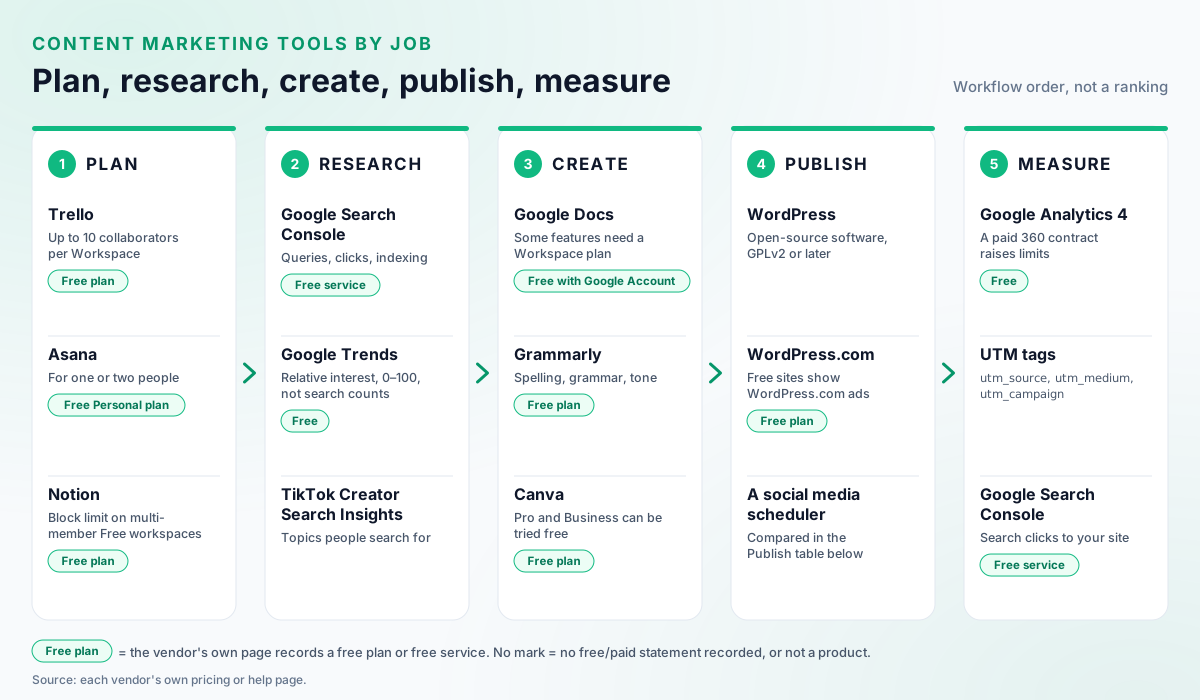
| Job | What it covers | Free options in this guide |
|---|---|---|
| Plan | Calendar, briefs, who does what | Trello, Asana, Notion |
| Research | What people search for and what is trending | Google Search Console, Google Trends |
| Create | Writing, editing, design | Google Docs, Grammarly, Canva, Adobe Express |
| Publish | Website, email, social posts | WordPress.com, Mailchimp, free social schedulers |
| Measure | Visits, sources, conversions | Google Analytics, Search Console |
Plan: calendars and project boards
Any board or calendar works if the whole team uses it: Trello, Asana and Notion all have free plans. Start from a free content calendar template if you only need dates and owners, and settle your recurring themes with content pillars before you fill it.
| Tool | What the vendor says it does | Free plan | Paid plans |
|---|---|---|---|
| Trello | An Inbox for capturing tasks, Boards for tracking work to done, and a Planner. Checked against Trello home pageVendor's own description | Yes, for up to 10 collaborators per Workspace | Per-user prices for Standard, Premium and Enterprise. Checked against Trello: PricingVendor's own description |
| Asana | A work management platform where people and AI agents run workflows on the same plan. Checked against Asana: ProductVendor's own description | Personal plan, “for one or two people” | Per-user Starter and Advanced, billed annually; Enterprise through sales. Checked against Asana: PricingVendor's own description |
| Notion | A workspace to capture knowledge, find answers with AI and automate tasks with agents. Checked against Notion: ProductVendor's own description | Yes; a multi-member Free workspace has a block limit | Plus, Business and Enterprise; Plus (one member) is free for students and educators. Checked against Notion: PricingVendor's own description |
Two more planners publish their pricing models. CoSchedule lists prices for Starter and Professional, each with a 14-day free trial, sells Suite through sales, and its plan comparison covers social publishing, a calendar, analytics, AI tools and campaign planning. Checked against CoSchedule: PricingVendor's own description Airtable has a Free plan for individuals or very small teams, Team and Business plans charged per seat, and Enterprise Scale through sales. Checked against Airtable: PricingVendor's own description
Research: what your audience searches for
Start with first-party data: Search Console for your own site, Google Trends for interest over time, and TikTok’s own tools for searches and trending hashtags on TikTok. Search Console and Trends are free.
- Google Search Console is a free Google service that shows how often your site appears in Google Search, which queries show it and how often searchers click, and flags crawling, indexing and spam issues. Checked against Search Console Help: About Search Console The queries you already appear for are a natural list of topics to write next.
- Google Trends is free to explore, according to the Google News Initiative. Checked against Google News Initiative: Basics of Google Trends Read it with care: Trends uses a sample of searches, scales each point from 0 to 100, shows low-volume terms as 0 and adds noise that is most visible on low-interest queries. Checked against Google Trends Help: FAQ about Google Trends data It shows relative interest, never a number of searches.
- TikTok Creator Search Insights, inside the TikTok app, shows topics people search for, including a Content gap filter for under-served searches. Checked against TikTok Help Center: Creator Search Insights
- TikTok Creative Center Trends shows trending hashtags by industry, with analytics for each hashtag. Checked against TikTok Business Help Center: How to use Trends (last updated July 2026)
When the research turns into a list of topics, the content idea generator turns each topic into post angles.
Create: writing and design tools
Free tiers cover most writing and design work; paid plans add rewrites, plagiarism and AI-text checks, and premium editing. Anyone with a Google Account can create in Google Docs; some features need a Google Workspace plan. Checked against Google Workspace: Google DocsVendor's own description
| Tool | Free plan | What paying adds | Trial |
|---|---|---|---|
| Grammarly | Spelling and grammar correction and tone detection | Pro: full-sentence rewrites, plagiarism and AI-text detection; Enterprise through Superhuman Go | Pro can be tried free Checked against Grammarly: Prices and PlansVendor's own description |
| Canva | Available to anyone; a drag-and-drop editor with 1,000+ design types | Pro and Business (Business billed per person); Enterprise through sales | Free trial of Pro or Business, once per account and payment method Checked against Canva: PricingVendor's own description Checked against Canva Help Center: Upgrade to Canva Pro or Canva BusinessVendor's own description |
| Adobe Express | Yes | Premium for features such as background removal and bulk resize; team and enterprise plans | Premium has a free trial Checked against Adobe Express: PricingVendor's own description |
None of these vendors states a trial length on the pages read, so check the trial terms before you start one. If you design data-heavy visuals, see what an infographic is and the main types.
Publish: CMS and social scheduling
Publishing takes three channels: a website for long content, an email tool for subscribers, and a scheduler for social posts. Each has a free route:
| Channel | Free route | What paying adds | Source |
|---|---|---|---|
| Website | A WordPress.com free plan, whose sites show WordPress.com ads to visitors | Paid plans from Personal up remove the ads | Checked against WordPress.com: PricingVendor's own description |
| Mailchimp Free: 1 seat, one audience of up to 250 contacts, up to 500 sends a month (250 a day) | Essentials, Standard and Premium, priced by contact count; Essentials and Standard can be tried free for 14 days | Checked against Mailchimp: Marketing plans and pricingVendor's own description | |
| Social scheduler | Buffer Free ($0, up to 3 channels); Metricool Free ($0); Meta Business Suite ($0) for Meta’s own apps, including Facebook and Instagram | Buffer Essentials $6 per channel/month; Metricool Starter $25 per month | Prices verified on buffer.com/pricing, metricool.com/pricing and facebook.com/business/help/205614130852988 |
Website. If you host your own site instead, WordPress is open-source software licensed under the GPLv2 or later; it started in 2003 as a fork of b2/cafelog. Checked against WordPress.org: AboutVendor's own description
Social. Meta’s Planner, inside Meta Business Suite, is a week or month calendar of published and scheduled posts, stories, reels and ads. Checked against Meta Business Help Center: Use Planner in Meta Business Suite on desktop The best social media scheduler comparison covers the paid options in more depth.
Measure: traffic and conversions
Google Analytics and Search Console, both free, show what each piece of content brought in; UTM tags tell you which post or email sent the visit.
- Google Analytics 4 is free of charge, according to Google; a paid Analytics 360 contract raises limits such as key events and custom dimensions. Checked against Google Marketing Platform: Google Analytics
- Social traffic lands in GA4’s default channels: visits from non-ad links on social sites count as Organic Social, and visits from social ads as Paid Social. Checked against Analytics Help: [GA4] Default channel group
- UTM tags: Google Analytics says to always use utm_source, utm_medium and utm_campaign on tagged links. Checked against Google Analytics Help: URL builders: Collect campaign data with custom URLs Build them with the free UTM generator, using one naming scheme for every channel.
- Search Console shows which Google queries show your site and how often searchers click (see Research above).
Each network’s own numbers sit in its native analytics; social media analytics tools compares those and the specialist tools, and social media KPIs sets out which numbers to report.
A content marketing stack that costs nothing
You can run all five jobs on free plans; the limits, not the price, are what you outgrow.
- Plan: Trello Free, for up to 10 collaborators per Workspace. Checked against Trello: PricingVendor's own description
- Research: Google Search Console Checked against Search Console Help: About Search Console and Google Trends. Checked against Google News Initiative: Basics of Google Trends
- Create: Google Docs Checked against Google Workspace: Google DocsVendor's own description, Grammarly Free Checked against Grammarly: Prices and PlansVendor's own description and Canva Free. Checked against Canva: PricingVendor's own description
- Publish: a WordPress.com free site, which shows its ads Checked against WordPress.com: PricingVendor's own description; Mailchimp Free, up to 250 contacts Checked against Mailchimp: Marketing plans and pricingVendor's own description; and Buffer Free or Meta Business Suite for social. Prices verified on buffer.com/pricing and facebook.com/business/help/205614130852988
- Measure: Google Analytics Checked against Google Marketing Platform: Google Analytics with UTM-tagged links.
The caps to watch are Mailchimp’s 250 contacts and Buffer’s 3 channels. When one blocks you, upgrade that tool, not the whole stack.
Content marketing platforms vs a tool stack
A content marketing platform puts several jobs in one product; a stack keeps the best tool for each job. HubSpot describes its Content Hub as AI content creation combined with a CMS for creating, repurposing and managing content, including landing pages and an AI blog writer. Checked against HubSpot: Content HubVendor's own description It has free tools, publishes prices for Starter (per seat), Professional (3 core seats included) and Enterprise (5 core seats included), and offers a 14-day free trial. Checked against HubSpot: Content Hub pricingVendor's own description Compare current prices on HubSpot’s Content Hub pricing page.
| Content marketing platform | Tool stack | |
|---|---|---|
| Setup | One product, one login | One tool per job |
| Cost | One subscription; HubSpot’s paid plans are priced by seats | Free plans first, upgrades one at a time |
| Data | Content managed in one place | Joined through UTM tags and analytics |
| Best for | Teams that publish mainly on their own site | Teams that publish across a site, email and several networks |
Decide the jobs before the software: a B2B content marketing strategy sets which jobs matter most, and the tool follows.
Content marketing tools FAQ
What are content marketing tools?
Content marketing tools are the software you use to plan, research, create, publish and measure content. Most teams need one tool for each of those five jobs: a calendar or project board, a way to see what people search for, a writing and design tool, a place to publish (a website, an email tool and a social scheduler) and analytics that show which content brought visitors.
What are the best free content marketing tools?
Each job has an option with a free plan. Trello, Asana and Notion have free plans for planning; Google Search Console and Google Trends are free for research; Google Docs, Grammarly and Canva have free tiers for writing and design; WordPress.com has a free plan that shows its ads; Mailchimp has a free email plan; and Google Analytics is free for measurement. The free-plan limits are in the tables in this guide.
What is a content marketing platform?
A content marketing platform puts several jobs in one product. HubSpot, for example, describes its Content Hub as AI content creation combined with a CMS for creating, repurposing and managing content, with free tools, paid Starter, Professional and Enterprise plans and a 14-day free trial. A stack of separate tools can cost less but means moving work between products.